What is Littencaptcha?
Littencaptcha is a cloud-based CAPTCHA solving API. Submit any supported CAPTCHA challenge via a simple HTTP request and receive a valid token within seconds — charged only on success.
Key features
| Feature | Details |
|---|---|
| Pay per success | You are only charged when a CAPTCHA is solved successfully. Failed tasks cost nothing. |
| No subscription | Top up your balance and use it at your own pace. No monthly fees or commitments. |
| Low latency | Average solve time under 5 seconds for all supported types. |
| API compatible | Uses the same request format as other popular CAPTCHA solving services — no extra migration work required. |
| Free credit | New accounts receive $0.025 in free credit on registration. No card required. |
Pricing
| Captcha type | Price per solve | Status |
|---|---|---|
| Cloudflare Turnstile | $0.001 | ● Live |
| Altcha | $0.0006 | ● Live |
| FriendlyCaptcha | $0.0012 | ● Live |
| FaucetPay Captcha | $0.0008 | ● Live |
Getting Started
Littencaptcha works through a simple two-step API: submit a CAPTCHA task, then retrieve the result. You can be up and running in under 5 minutes.
Setup — 3 steps
Create a free account
Register at littencaptcha.com/register. Your account is activated instantly and credited with $0.025 — no credit card required. That's enough to test roughly 25 Turnstile solves.
Copy your API key
Go to your Dashboard. The API Key section shows your key. Copy it — you will pass it as clientKey in every API request. Treat it like a password; do not commit it to source control.
Submit and retrieve
Call POST /createTask to queue a solve. You get a taskId back immediately. Poll POST /getTaskResult with that ID every 2 seconds until "status": "ready".
How the API works
with your API key & CAPTCHA params
depending on captcha type
every 2 s until status = ready
Code examples
The following examples solve a Cloudflare Turnstile. Swap out the task object for other CAPTCHA types — see Captcha Types.
# pip install requests
import requests, time

API_KEY = "YOUR_API_KEY"
BASE    = "https://api.littencaptcha.com"

# Step 1 — create task
resp = requests.post(BASE + "/createTask", json={
    "clientKey": API_KEY,
    "task": {
        "type":       "TurnstileTask",
        "websiteURL": "https://example.com/page",
        "websiteKey": "0x4AAAAAAABkMYinukE8nzYD",
    }
}).json()

if resp.get("errorId"):
    raise RuntimeError(resp["errorCode"])

task_id = resp["taskId"]

# Step 2 — poll until ready
for _ in range(30):
    time.sleep(2)
    r = requests.post(BASE + "/getTaskResult", json={
        "clientKey": API_KEY,
        "taskId":    task_id,
    }).json()
    if r["status"] == "ready":
        token = r["solution"]["token"]
        print("Token:", token)
        break
else:
raise TimeoutError("Task did not finish in 60 s")// Node.js — using built-in fetch (Node 18+)
const API_KEY = 'YOUR_API_KEY';
const BASE = 'https://api.littencaptcha.com';
async function solveTurnstile(url, sitekey) {
// Step 1 — create task
const { taskId, errorCode } = await fetch(BASE + '/createTask', {
method: 'POST',
headers: { 'Content-Type': 'application/json' },
body: JSON.stringify({ clientKey: API_KEY, task: { type: 'TurnstileTask', websiteURL: url, websiteKey: sitekey } })
}).then(r => r.json());
if (errorCode) throw new Error(errorCode);
// Step 2 — poll until ready
for (let i = 0; i < 30; i++) {
await new Promise(r => setTimeout(r, 2000));
const res = await fetch(BASE + '/getTaskResult', {
method: 'POST', headers: { 'Content-Type': 'application/json' },
body: JSON.stringify({ clientKey: API_KEY, taskId })
}).then(r => r.json());
if (res.status === 'ready') return res.solution.token;
}
throw new Error('Timed out');
}
solveTurnstile('https://example.com/page', '0x4AAAAAAABkMYinukE8nzYD')
.then(token => console.log('Token:', token))
.catch(console.error);# Step 1 — create task (save taskId from output)
curl -sX POST https://api.littencaptcha.com/createTask \
-H 'Content-Type: application/json' \
-d '{"clientKey":"YOUR_API_KEY","task":{"type":"TurnstileTask","websiteURL":"https://example.com","websiteKey":"0x4AAAAAAABkMYinukE8nzYD"}}'
# {"errorId":0,"taskId":48291}
# Step 2 — poll for result (replace 48291 with your taskId)
curl -sX POST https://api.littencaptcha.com/getTaskResult \
-H 'Content-Type: application/json' \
-d '{"clientKey":"YOUR_API_KEY","taskId":48291}'
# {"errorId":0,"status":"ready","solution":{"token":"0.vQz4Fg9bXk4r5RVkM..."}}Best practices
"errorId" on every response — a value of 1 means something went wrong; read errorCode for details.ERROR_CAPTCHA_UNSOLVABLE simply retry createTask — you are not charged for failed tasks.Request fields
| Field | Type | Description | |
|---|---|---|---|
| clientKey | string | required | Your API key from the Dashboard. Every request must include this. |
| task | object | required | Task object containing at minimum a type field. Additional fields depend on the CAPTCHA type — see Cloudflare Turnstile or Altcha. |
The task object
The task object structure varies per CAPTCHA type. The type field always selects which solver is used:
| type value | CAPTCHA | Status |
|---|---|---|
| TurnstileTask | Cloudflare Turnstile | ● Live |
| AltchaTask | Altcha | ● Live |
| FriendlyCaptchaTask | FriendlyCaptcha | ● Live |
| FaucetPayTask | FaucetPay Captcha | ● Live |
Response — success
{
  "errorId": 0,
  "taskId":  48291
}
Response — error
{
  "errorId":          1,
  "errorCode":        "ERROR_KEY_DOES_NOT_EXIST",
  "errorDescription": "Invalid API key"
}
Request examples
{
  "clientKey": "YOUR_API_KEY",
  "task": {
    "type":       "TurnstileTask",
    "websiteURL": "https://example.com/protected",
    "websiteKey": "0x4AAAAAAABkMYinukE8nzYD"
  }
}{
"clientKey": "YOUR_API_KEY",
"task": {
"type": "AltchaTask",
"challenge": "sha256-cc67f6d...",
"salt": "a1b2c3d4",
"algorithm": "SHA-256",
"maxNumber": 1000000
}
}Request fields
| Field | Type | Description | |
|---|---|---|---|
| clientKey | string | required | Your API key. |
| taskId | integer | required | The taskId returned by createTask. |
Possible response states
Still processing
The task has been received and is being worked on. Keep polling.
{
  "errorId": 0,
  "status":  "processing"
}
Ready — Turnstile token
Use solution.token as the value for cf-turnstile-response in your form or POST body.
{
  "errorId":  0,
  "status":   "ready",
  "solution": {
    "token": "0.vQz4Fg9bXk4r5RVkM...",
    "type":  "default"
  },
  "cost":     0.001,
  "solveMs": 3247
}
Ready — Altcha solution
Submit the entire solution object back to the Altcha widget or endpoint. Altcha encodes it as a base64 JSON payload.
{
  "errorId":  0,
  "status":   "ready",
  "solution": {
    "number":    48291,
    "algorithm": "SHA-256",
    "challenge": "sha256-cc67f6d...",
    "salt":      "a1b2c3d4e5f6",
    "signature": "hmac-sig..."
  },
  "cost":     0.0005,
  "solveMs": 412
}
Error
The task failed. errorId: 1 and errorCode explain the reason. On ERROR_CAPTCHA_UNSOLVABLE you are not charged — just retry.
{
  "errorId":          1,
  "errorCode":        "ERROR_CAPTCHA_UNSOLVABLE",
  "errorDescription": "Could not solve the CAPTCHA"
}
Polling pattern
def wait_for_result(session, base, key, task_id, timeout=60):
    for _ in range(timeout // 2):
        time.sleep(2)
        r = session.post(base + "/getTaskResult", json={
            "clientKey": key, "taskId": task_id
        }).json()
        if r.get("errorId"):
            raise RuntimeError(r.get("errorCode"))
        if r["status"] == "ready":
            return r["solution"]
raise TimeoutError(f"Task {task_id} not done in {timeout}s")async function waitForResult(apiKey, taskId, timeoutMs = 60000) {
const deadline = Date.now() + timeoutMs;
while (Date.now() < deadline) {
await new Promise(r => setTimeout(r, 2000));
const r = await fetch('/getTaskResult', {
method: 'POST', headers: { 'Content-Type': 'application/json' },
body: JSON.stringify({ clientKey: apiKey, taskId })
}).then(x => x.json());
if (r.errorId) throw new Error(r.errorCode);
if (r.status === 'ready') return r.solution;
}
throw new Error(`Task ${taskId} timed out`);
}Request
| Field | Type | Description | |
|---|---|---|---|
| clientKey | string | required | Your API key. |
{ "clientKey": "YOUR_API_KEY" }Response
{
  "errorId": 0,
  "balance": 0.4200  // USD, 4 decimal places
}getBalance at the start of a batch run to check you have enough credit before queuing thousands of tasks. Each Turnstile solve costs $0.001, Altcha $0.0006, FriendlyCaptcha $0.0012, FaucetPay $0.0008.Quick check example
r = requests.post("https://api.littencaptcha.com/getBalance",
                  json={"clientKey": API_KEY}).json()
balance = r["balance"]
print(f"Balance: ${balance:.4f}")
if balance < 0.025:
print("⚠ Low balance — top up before running batch")Request fields
| Field | Type | Description | |
|---|---|---|---|
| clientKey | string | required | Your API key. The endpoint validates the key before returning the user agent. |
{ "clientKey": "YOUR_API_KEY" }Response
{
  "errorId":   0,
  "userAgent": "Mozilla/5.0 (Windows NT 10.0; Win64; x64) AppleWebKit/537.36 (KHTML, like Gecko) Chrome/131.0.0.0 Safari/537.36"
}getUserAgent at the start of each session rather than hard-coding the value, so your requests stay in sync.Why it matters
When Littencaptcha solves a Turnstile challenge, the token is cryptographically bound to the browser session that generated it — including its User-Agent. If you then submit that token using a different User-Agent string, some sites will reject the token as mismatched.
By fetching the solver's exact User-Agent and applying it to your outgoing requests, you ensure the fingerprint is consistent end-to-end, maximising the acceptance rate of submitted tokens.
Usage example
import requests, time

API_KEY = "YOUR_API_KEY"
BASE    = "https://api.littencaptcha.com"

# 1 — fetch the solver's user agent once per session
ua_resp = requests.post(BASE + "/getUserAgent", json={"clientKey": API_KEY}).json()
solver_ua = ua_resp["userAgent"]

# 2 — solve the CAPTCHA
task_id = requests.post(BASE + "/createTask", json={
    "clientKey": API_KEY,
    "task": {
        "type":       "TurnstileTask",
        "websiteURL": "https://example.com/login",
        "websiteKey": "0x4AAAAAAABkMYinukE8nzYD",
    }
}).json()["taskId"]

for _ in range(30):
    time.sleep(2)
    r = requests.post(BASE + "/getTaskResult",
                      json={"clientKey": API_KEY, "taskId": task_id}).json()
    if r["status"] == "ready":
        token = r["solution"]["token"]
        break

# 3 — submit using the SAME user agent the solver used
session = requests.Session()
session.headers["User-Agent"] = solver_ua

session.post("https://example.com/login", data={
    "username":              "alice",
    "password":              "secret",
    "cf-turnstile-response": token,
})const API_KEY = 'YOUR_API_KEY';
const BASE = 'https://api.littencaptcha.com';
// 1 — fetch solver's user agent
const { userAgent } = await fetch(BASE + '/getUserAgent', {
method: 'POST', headers: { 'Content-Type': 'application/json' },
body: JSON.stringify({ clientKey: API_KEY }),
}).then(r => r.json());
// 2 — solve Turnstile
const { taskId } = await fetch(BASE + '/createTask', {
method: 'POST', headers: { 'Content-Type': 'application/json' },
body: JSON.stringify({ clientKey: API_KEY, task: {
type: 'TurnstileTask', websiteURL: 'https://example.com/login',
websiteKey: '0x4AAAAAAABkMYinukE8nzYD'
}}),
}).then(r => r.json());
// ... poll getTaskResult for the token ...
// 3 — submit with matching user agent
await fetch('https://example.com/api/login', {
method: 'POST',
headers: { 'Content-Type': 'application/json', 'User-Agent': userAgent },
body: JSON.stringify({ username: 'alice', password: 'secret', 'cf-turnstile-response': token }),
});POST /in.php — Submit task
Accepts both application/x-www-form-urlencoded and JSON. Returns OK|task_id on success, or ERROR|code on failure.
| Field | Type | Description | |
|---|---|---|---|
| key | string | required | Your API key. |
| method | string | required | turnstile or altcha |
| pageurl | string | required | Page URL (for Turnstile). |
| sitekey | string | required | Site key (for Turnstile). |
curl -sX POST https://api.littencaptcha.com/in.php \
  -d "key=YOUR_API_KEY&method=turnstile&pageurl=https://example.com&sitekey=0x4AAA…"
# Returns: OK|48291
GET /res.php — Get result
Returns CAPCHA_NOT_READY while solving, OK|token on success, or ERROR|code on failure. Use action=getbalance to check balance.
curl "https://api.littencaptcha.com/res.php?action=get&key=YOUR_API_KEY&id=48291"
# Returns: OK|0.vQz4Fg9bXk4r5RVkM...
Cloudflare Turnstile
TurnstileTaskCloudflare Turnstile is a browser-side CAPTCHA alternative. Littencaptcha solves it by simulating a real browser visit to the target page. You provide the page URL and the widget's sitekey — a valid token is returned within a few seconds.
CLOUDFLARE
Privacy · Terms
CLOUDFLARE
Privacy · Terms
CLOUDFLARE
Privacy · Terms
How to find the sitekey
Every Turnstile widget has a unique sitekey. You need to extract it from the target page before submitting a task.
Look in the HTML source
Right-click the page → View Page Source (or press Ctrl+U). Search for cf-turnstile. The data-sitekey attribute on that element is what you need.
Or check the network tab
Open DevTools → Network → filter by challenges.cloudflare.com. The request URL contains the sitekey as a query parameter.
<!-- The value of data-sitekey is what you pass as websiteKey -->
<div class="cf-turnstile"
     data-sitekey="0x4AAAAAAABkMYinukE8nzYD"
     data-action="login"></div>
Task parameters
| Field | Type | Description | |
|---|---|---|---|
| type | string | required | Must be "TurnstileTask" |
| websiteURL | string | required | Full URL of the page where the Turnstile widget is embedded (e.g. https://example.com/login). Must match the URL Cloudflare expects. |
| websiteKey | string | required | The Turnstile sitekey — the data-sitekey value from the widget's HTML element. |
| proxy | string | optional | Proxy to route the browser through: http://user:pass@host:port. Leave empty in the vast majority of cases — only needed when the target site restricts access by IP region. |
Request example
{
  "clientKey": "YOUR_API_KEY",
  "task": {
    "type":       "TurnstileTask",
    "websiteURL": "https://example.com/login",
    "websiteKey": "0x4AAAAAAABkMYinukE8nzYD"
  }
}
Using the token
Once the task is "ready", read solution.token from the result. Submit it as the cf-turnstile-response field in your form or POST body — the same field the widget would normally fill in automatically.
# Python — inject token into a form POST
token = solution["token"]
resp = session.post("https://example.com/login", data={
    "username":              "alice",
    "password":              "secret",
    "cf-turnstile-response": token,
})// JavaScript — inject token into a JSON API call
const token = solution.token;
const res = await fetch('https://example.com/api/login', {
method: 'POST',
headers: { 'Content-Type': 'application/json' },
body: JSON.stringify({
username: 'alice', password: 'secret',
'cf-turnstile-response': token,
}),
});
Altcha
AltchaTaskAltcha is a privacy-respecting CAPTCHA alternative that works entirely through server-side Proof-of-Work computation — no images, no cookies, no tracking. Littencaptcha solves Altcha challenges almost instantly (typically under 1 second).
How Altcha works
How to get challenge parameters
Find the widget
Inspect the page HTML and look for an <altcha-widget> element. Note its challengeurl attribute.
Fetch the challenge JSON
Make a GET request to that challengeurl. The response is a JSON object containing challenge, salt, algorithm, maxnumber, and signature.
Pass all fields to AltchaTask
Include all values from the challenge response in your AltchaTask object. The more fields you include, the higher the verification success rate.
<altcha-widget
  challengeurl="https://example.com/api/altcha-challenge"
name="altcha"></altcha-widget>import requests, time, json, base64
API_KEY = "YOUR_API_KEY"
BASE = "https://api.littencaptcha.com"
# Step 1 — fetch challenge from target site
chall = requests.get("https://example.com/api/altcha-challenge").json()
# Step 2 — create AltchaTask
task_id = requests.post(BASE + "/createTask", json={
"clientKey": API_KEY,
"task": {
"type": "AltchaTask",
"challenge": chall["challenge"],
"salt": chall["salt"],
"algorithm": chall.get("algorithm", "SHA-256"),
"maxNumber": chall.get("maxnumber", 1000000),
"signature": chall.get("signature", ""),
}
}).json()["taskId"]
# Step 3 — poll for result
for _ in range(30):
time.sleep(2)
r = requests.post(BASE + "/getTaskResult",
json={"clientKey": API_KEY, "taskId": task_id}).json()
if r["status"] == "ready":
sol = r["solution"]
# Altcha expects a base64-encoded JSON payload
payload = base64.b64encode(json.dumps(sol).encode()).decode()
break
# Step 4 — submit payload in the form
requests.post("https://example.com/submit", data={
"altcha": payload,
"email": "[email protected]",
})Task parameters
| Field | Type | Description | |
|---|---|---|---|
| type | string | required | Must be "AltchaTask" |
| challenge | string | required | The challenge hash from the site's challenge endpoint (usually starts with sha256-). |
| salt | string | required | Salt string from the challenge endpoint. Used to compute the correct hash. |
| algorithm | string | optional | Hash algorithm to use. Default: "SHA-256". Match the value from the challenge response. |
| maxNumber | integer | optional | Upper bound for nonce search. Default: 1000000. Pass the challenge response's maxnumber if present. |
| signature | string | optional | HMAC signature from the challenge endpoint. Pass it back in the solution for server-side verification. |

Friendly Captcha
FriendlyCaptchaTaskFriendly Captcha is a privacy-first CAPTCHA alternative that uses proof-of-work puzzles solved in the browser — no cookies, no tracking, no third-party requests. Littencaptcha handles the puzzle computation on your behalf and returns a valid solution token.
How to find the sitekey
Each Friendly Captcha widget has a sitekey identifying your account. You need to extract it from the target page before submitting a task.
Look in the HTML source
Right-click the page → View Page Source. Search for frc-captcha or friendly-challenge. The data-sitekey attribute is your sitekey.
Or inspect the widget element
Open DevTools → Elements, click the CAPTCHA widget. Look for the data-sitekey attribute on the <div class="frc-captcha"> element.
<!-- data-sitekey is what you pass as websiteKey -->
<div class="frc-captcha"
     data-sitekey="FCMTST000000000000000000"
     data-puzzle-endpoint="https://api.friendlycaptcha.com/api/v1/puzzle"></div>
Task parameters
| Field | Type | Description | |
|---|---|---|---|
| type | string | required | FriendlyCaptchaTask |
| websiteURL | string | required | Full URL of the page containing the widget. |
| websiteKey | string | required | The data-sitekey value from the widget element. |
| puzzleEndpoint | string | optional | Custom puzzle endpoint URL. Defaults to https://api.friendlycaptcha.com/api/v1/puzzle. |
Request example
import requests, time

API_KEY = "YOUR_API_KEY"
BASE    = "https://api.littencaptcha.com"

# Step 1 — create task
resp = requests.post(BASE + "/createTask", json={
    "clientKey": API_KEY,
    "task": {
        "type":       "FriendlyCaptchaTask",
        "websiteURL": "https://example.com/login",
        "websiteKey": "FCMTST000000000000000000",
    }
})
task_id = resp.json()["taskId"]

# Step 2 — poll for result
while True:
    time.sleep(3)
    result = requests.post(BASE + "/getTaskResult", json={
        "clientKey": API_KEY, "taskId": task_id
    }).json()
    if result["status"] == "ready":
        token = result["solution"]["token"]
breakconst resp = await fetch('https://api.littencaptcha.com/createTask', {
method: 'POST',
headers: { 'Content-Type': 'application/json' },
body: JSON.stringify({
clientKey: 'YOUR_API_KEY',
task: {
type: 'FriendlyCaptchaTask',
websiteURL: 'https://example.com/login',
websiteKey: 'FCMTST000000000000000000',
}
})
});
const { taskId } = await resp.json();curl -sX POST https://api.littencaptcha.com/createTask \
-H 'Content-Type: application/json' \
-d '{"clientKey":"YOUR_API_KEY","task":{"type":"FriendlyCaptchaTask","websiteURL":"https://example.com/login","websiteKey":"FCMTST000000000000000000"}}'Using the token
Submit the returned token in the form field named frc-captcha-solution (v1) or frc-captcha-response (v2). The server validates it against the Friendly Captcha API.
# Python — inject token into a form POST
resp = session.post("https://example.com/login", data={
    "username":              "alice",
    "password":              "secret",
    "frc-captcha-solution":  token,
})// JavaScript — inject token into a JSON API call
const res = await fetch('https://example.com/api/login', {
method: 'POST',
headers: { 'Content-Type': 'application/json' },
body: JSON.stringify({
username: 'alice', password: 'secret',
'frc-captcha-solution': token,
}),
});
FaucetPay Captcha
FaucetPayTaskFaucetPay Captcha is a visual challenge used by crypto faucet and claim sites. Littencaptcha solves it server-side — no browser, no proxy, no manual interaction required. You provide the page URL and sitekey and receive a valid token within seconds.
 Initial state (checkbox)
 Slider puzzle (drag to fit)
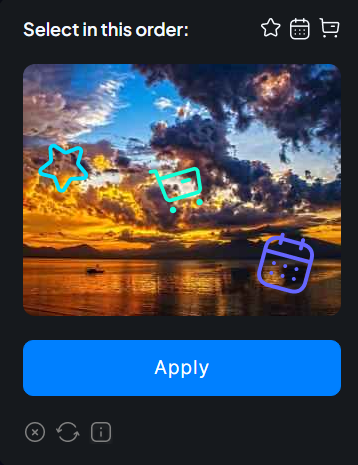 Icon selection (tap in order)
How to find the sitekey
Open the target faucet page, open DevTools (F12) → Network tab, then trigger the captcha widget. Look for a request to faucetpay.io — the sitekey parameter in the URL or request body is your website key.
View Page Source
Right-click → View Page Source. Search for faucetpay or sitekey. The value next to it is your key.
Inspect the widget element
Open DevTools → Elements, click the captcha widget. Look for a data-sitekey or sitekey attribute on the widget's container element.
Task parameters
| Field | Type | Description | |
|---|---|---|---|
| type | string | required | FaucetPayTask |
| websiteURL | string | required | Full URL of the page containing the captcha widget. |
| websiteKey | string | required | The FaucetPay sitekey from the target page. |
| cookies | boolean | optional | Set true to return response cookies alongside the token. |
Request example
import requests, time

API_KEY = "YOUR_API_KEY"
BASE    = "https://api.littencaptcha.com"

# Step 1 — create task
resp = requests.post(BASE + "/createTask", json={
    "clientKey": API_KEY,
    "task": {
        "type":       "FaucetPayTask",
        "websiteURL": "https://example-faucet.com/claim",
        "websiteKey": "YOUR_SITE_KEY",
    }
})
task_id = resp.json()["taskId"]

# Step 2 — poll for result
while True:
    time.sleep(3)
    result = requests.post(BASE + "/getTaskResult", json={
        "clientKey": API_KEY, "taskId": task_id
    }).json()
    if result["status"] == "ready":
        token = result["solution"]["token"]
breakconst resp = await fetch('https://api.littencaptcha.com/createTask', {
method: 'POST',
headers: { 'Content-Type': 'application/json' },
body: JSON.stringify({
clientKey: 'YOUR_API_KEY',
task: {
type: 'FaucetPayTask',
websiteURL: 'https://example-faucet.com/claim',
websiteKey: 'YOUR_SITE_KEY',
}
})
});
const { taskId } = await resp.json();
// Poll every 3 seconds
let token;
while (!token) {
await new Promise(r => setTimeout(r, 3000));
const res = await fetch('https://api.littencaptcha.com/getTaskResult', {
method: 'POST',
headers: { 'Content-Type': 'application/json' },
body: JSON.stringify({ clientKey: 'YOUR_API_KEY', taskId })
}).then(r => r.json());
if (res.status === 'ready') token = res.solution.token;
}curl -sX POST https://api.littencaptcha.com/createTask \
-H 'Content-Type: application/json' \
-d '{"clientKey":"YOUR_API_KEY","task":{"type":"FaucetPayTask","websiteURL":"https://example-faucet.com/claim","websiteKey":"YOUR_SITE_KEY"}}'Using the token
Submit the returned token in the form field the faucet site expects — typically named faucetpay_response or similar. Inspect the site's form HTML to confirm the exact field name.
{
  "errorId": 0,
  "status":  "ready",
  "solution": {
    "token": "FP_TOKEN_STRING_HERE"
  },
  "cost":    0.0006,
  "solveMs": 4200
}# Python — inject token into the faucet claim form
resp = session.post("https://example-faucet.com/claim", data={
"address": "your_wallet_address",
"faucetpay_response": token,
})reCAPTCHA v2
Once available, the task type will be RecaptchaV2Task with a price of $0.001 per solve.
hCaptcha
Once available, the task type will be HCaptchaTask with a price of $0.001 per solve.
Error Codes
When a request encounters a problem, the API responds with "errorId": 1 plus a machine-readable errorCode string and a human-readable errorDescription. Always check errorId first in your code.
{
  "errorId":          1,
  "errorCode":        "ERROR_KEY_DOES_NOT_EXIST",
  "errorDescription": "Invalid API key"
}"errorId": 0 — you can use this as a quick success check before reading any other field.Error reference
| Error code | HTTP | Meaning & fix |
|---|---|---|
| ERROR_KEY_DOES_NOT_EXIST | 401 | The clientKey is missing, misspelled, or has been revoked. Fix: copy your key from the Dashboard and ensure you are not accidentally adding whitespace or using an old key. |
| ERROR_ZERO_BALANCE | 402 | Your account has insufficient balance to queue this task. Fix: top up your balance in the Dashboard. Call getBalance first when running in batch to avoid this mid-run. |
| ERROR_TASK_NOT_SUPPORTED | 400 | The type value in your task object is not recognised. Fix: check the spelling against the supported types (TurnstileTask, AltchaTask). This also occurs for types that are coming soon. |
| ERROR_TASK_ABSENT | 404 | No task was found matching the given taskId for your API key. Fix: verify the taskId was returned by a createTask call made with the same API key. |
| ERROR_CAPTCHA_UNSOLVABLE | 200 | The solver was unable to complete this challenge. You are not charged. Fix: simply retry — most challenges succeed on a second or third attempt. If failures persist, double-check that websiteURL and websiteKey are correct. |
Error handling example
def create_task(session, base, key, task):
    r = session.post(base + "/createTask", json={
        "clientKey": key, "task": task
    }).json()

    if r.get("errorId"):
        code = r.get("errorCode", "UNKNOWN")
        if code == "ERROR_ZERO_BALANCE":
            raise RuntimeError("Top up your balance before continuing")
        if code == "ERROR_KEY_DOES_NOT_EXIST":
            raise ValueError("Check your API key in the Dashboard")
        raise RuntimeError(code)

return r["taskId"]FAQ
Common questions about Littencaptcha.
Yes. Littencaptcha implements both the native API and a compatible endpoint layer (/in.php and /res.php). Change your base URL to littencaptcha.com and you're done — no other code changes needed.
Go to your Dashboard → Billing. We accept major credit and debit cards. The minimum top-up is $1.00. New accounts get $0.10 free credit on registration.
Failed tasks return ERROR_CAPTCHA_UNSOLVABLE and your balance is not charged. You pay only for successful solves. Simply retry — in most cases a second attempt succeeds.
Altcha tasks are solved in under 1 second (pure computation). Cloudflare Turnstile takes between 2 and 8 seconds depending on the target page. Recommended polling interval: 2 seconds.
No. The proxy field in TurnstileTask is optional — omit it in the vast majority of cases. Use a proxy only if the target site has strict IP-based restrictions.
Open the target page, right-click → Inspect, and search for data-sitekey in the HTML. You can also look for it in the turnstile.js script initialization.
There is no hard rate limit on concurrent tasks. For very high volumes (>50 concurrent tasks) please contact us so we can ensure optimal routing for your account.
Any language that can make HTTP requests — Python, JavaScript/Node.js, PHP, Go, C#, Ruby, etc. Since we are 2Captcha-compatible, any existing 2Captcha SDK works by changing the base URL.
Updates
Release history and changelog for Littencaptcha.
/in.php endpoint — submit tasks in 2Captcha format/res.php endpoint — retrieve results & balanceTurnstileTask)AltchaTask)/createTask, /getTaskResult, /getBalance